How do I redeem a code for tickets to real-world events?
If you have received a redemption code containing a ticket to a Pokémon GO live event (such as Pokémon GO Fest) or event add-ons, you can claim it either through the in-game menu or through the 'Event Ticketing' section in the web store.
Follow these steps to ensure your code is applied to your account correctly:
How to Redeem Your Code
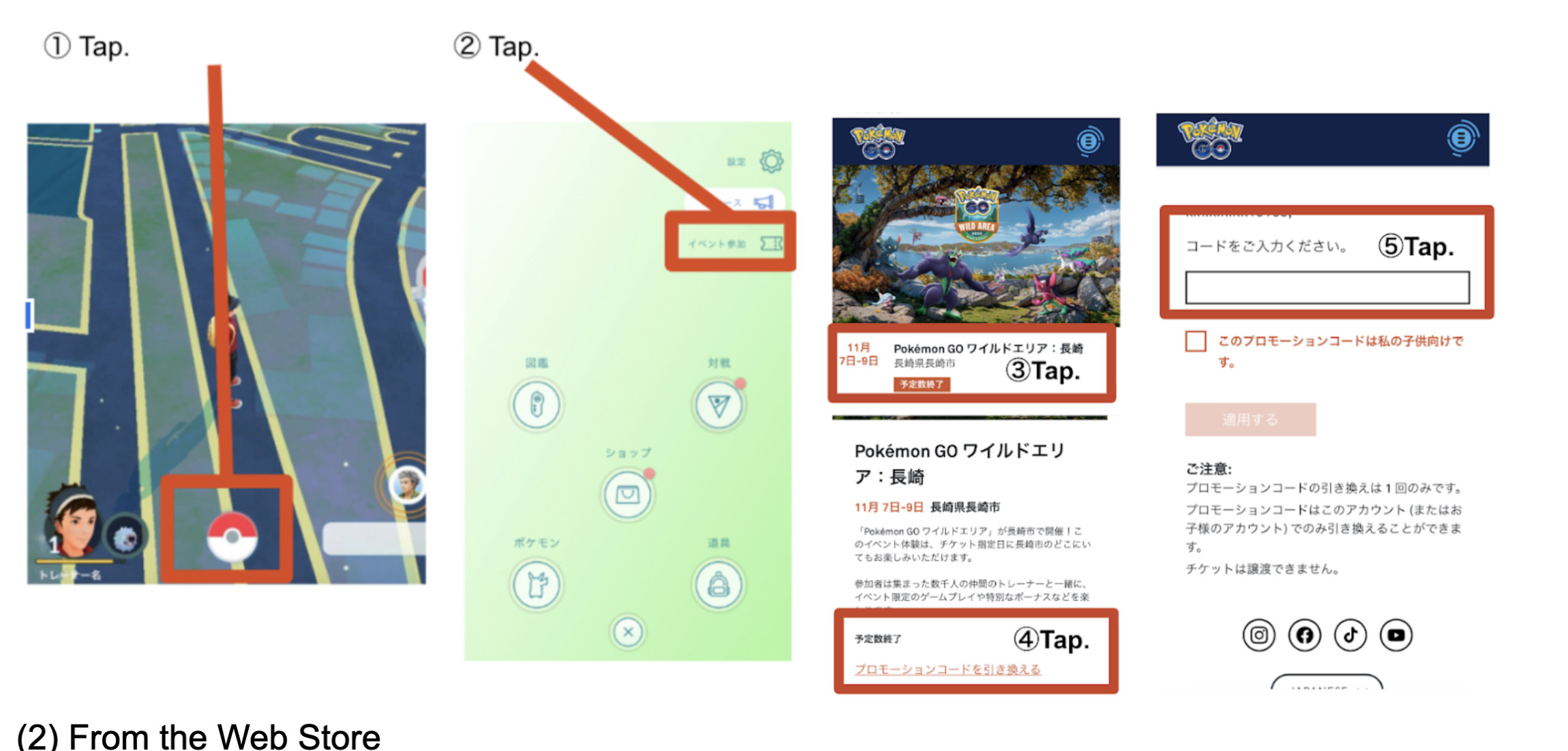
(1) From the In-Game Menu
From the Map View, tap the Main Menu
at the bottom center of your screen.Tap the Events button
located in the top-right corner of the menu.Find the specific real-world event you wish to attend (e.g., Pokémon GO Wild Area: Nagasaki) and tap on the event banner.
Scroll to the bottom of the event description page. Tap the link that says Redeem a promotion code
Enter and Apply Code
Tap the text box labeled "Please enter your code" .
Type or paste your unique redemption code.
If the code is for a child's account, ensure you check the appropriate box if prompted.
Tap Apply to finalize.

(2) From the Web Store
Go to: https://tickets.nianticlabs.com/events/#/eventlisting?appId=pgo
Find the specific real-world event you wish to attend (e.g., Pokémon GO Wild Area: Nagasaki) and tap on the event banner.
Scroll to the bottom of the event description page. Tap the link that says Redeem a promotion code
Enter and Apply Code
Tap the text box labeled "Please enter your code" .
Type or paste your unique redemption code.
If the code is for a child's account, ensure you check the appropriate box if prompted.
Tap Apply to finalize.Follow the same steps starting from Step 3 above.
Important Notes
One-Time Use: Each promotion code can only be redeemed once.
Account Specific: Ensure you are logged into the correct trainer account before redeeming, as tickets are non-transferable.
Sold Out Events: If an event is marked as "Sold Out", you can still redeem a valid code if you already possess one.