
The Map View is your window into the Pokémon GO world, and reflects your current location in the real world.
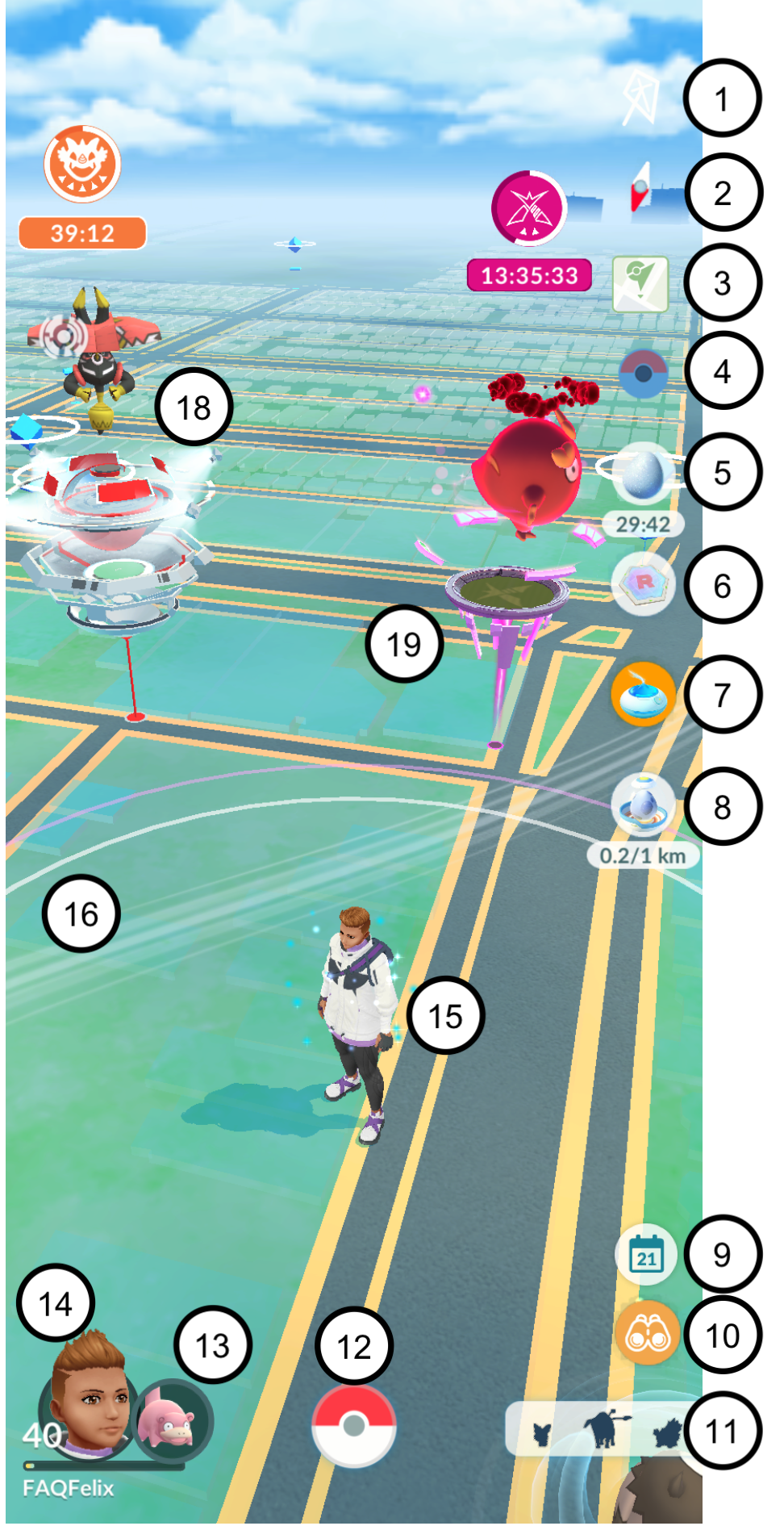
Weather boosts: Displays the current weather conditions and weather boosts in effect.
Compass: Toggles the viewing direction in Map View. You can switch between a north-viewing direction and auto-rotation, which follows your viewing direction.
Campfire: Tap to be taken to the Niantic Campfire App where you can view Raids, schedule Meetups or light a Flare.
Pokémon GO Bluetooth Devices: Disconnect, connect, or view the current status of your connected Bluetooth device. (Appears when paired.)
Active Bonuses: Displays any active item bonuses (such as Mega Evolution, Incense or Star Pieces) and the remaining time (only appears when a bonus is active).
Team GO Rocket Radar and Super Radar: Appears when equipped in the item bag. Tap to view a map of Team GO Rocket hideouts, challenge the Team GO Rocket Leads and their Boss.
Daily Adventure Egg: Tap to incubate your daily, free Adventure Egg (only appears if you haven’t used it for the day).
Daily Adventure Incense: Tap to activate your daily, free Adventure Incense for 15 minutes (only appears if you haven’t used it for the day).7
Events: Tap to view a list of events that are currently live along with links to access for more details.
Today View: See important information about what’s currently happening in Pokémon GO, including your Timed, Field and Special Research Tasks.
Nearby Menu: Displays Pokémon located nearby, both in the wild and at Gyms. Tap to open and see more nearby Pokémon, PokéStop Showcases, Raids, Power Spots, RSVPs, and Routes.
Main Menu: Tap to access settings, news, Events, your Item Bag, the Pokédex, the in-app shop, the Battle menu, your Pokémon inventory, or GO Snapshots.
Buddy Pokémon: This is your active Buddy Pokémon, earn Candy as you travel together and interact with them to increase your Buddy Level.
Trainer Menu: Tap to see Pokémon GO progress and achievements, change your Avatar’s outfit, change your Buddy Pokémon.
Trainer Avatar: Your Trainer avatar represents your location in the Real World.
Interaction Radius: This white ring represents the area in which wild Pokémon will appear as you explore the real world. The pink ring extends to the distance in which you can interact with PokéStops and Gyms.
PokéStops (not labeled in image): Real-world locations where Trainers can acquire items such as Poké Balls, Potions, Eggs, Field Research tasks, or participate in PokéStop Showcases.
Gyms: Locations where you can battle other teams’ Pokémon or leave a Pokémon to defend your team’s gym.
Power Spot: Locations where you can participate in a Max Battle and catch Dynamax and Gigantamax Pokémon.