
Follow these steps to check your ticket details and Order ID:
(1) From the Confirmation Email
You can find your ticket details and Order ID in the confirmation email, which is sent from [email protected].
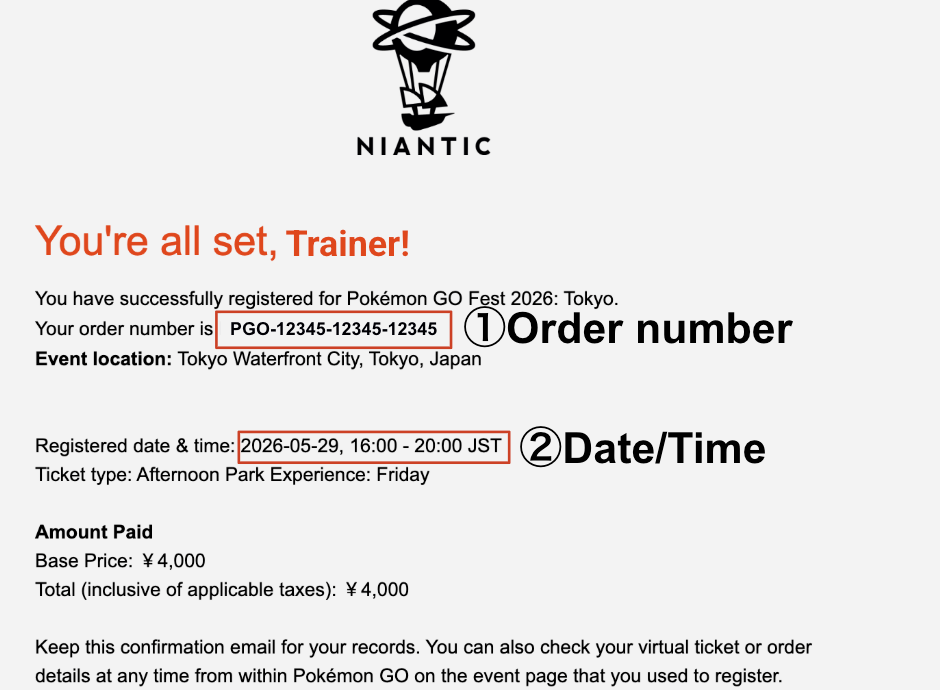
Refer to the example below:
① Order number: Your Order ID (starts with “PGO”)
② Date/Time: Your ticketed event date and time
(2) From the In-Game Menu
From the Map View, tap the Main Menu
at the bottom center of your screen.
Tap the Events button
located in the top-right corner of the menu.
Find the event you are attending (e.g., Pokémon GO Fest 2026: Tokyo) and tap on the event banner.
You can view your ticket details here, such as your selected event date and time.
For order-related information, including your order ID, please check “View my order(s)” at the bottom of the page.